
Pi Studio Activity Bookmarklet
Pi Studio Activity is a lightweight JavaScript bookmarklet that automatically manages the Ollama Pi package Pi-Studio response view modes. It eliminates the manual friction of switching between "Working" (raw token stream) and "Preview" (formatted markdown) views, providing a seamless, hands-free experience during AI interactions.
The Problem It Solves
Ollama Pi Studio is a powerful interface for local LLMs (Large Language Models), but it requires manual view management during response generation. By default, users must:
- Click "Raw" or "Working" when generation starts to see live tokens
- Click "Preview" when generation completes to see formatted output
The Bookmarklet automatically switches to Working and Preview modes at the right times, without extra clicks.
Demo
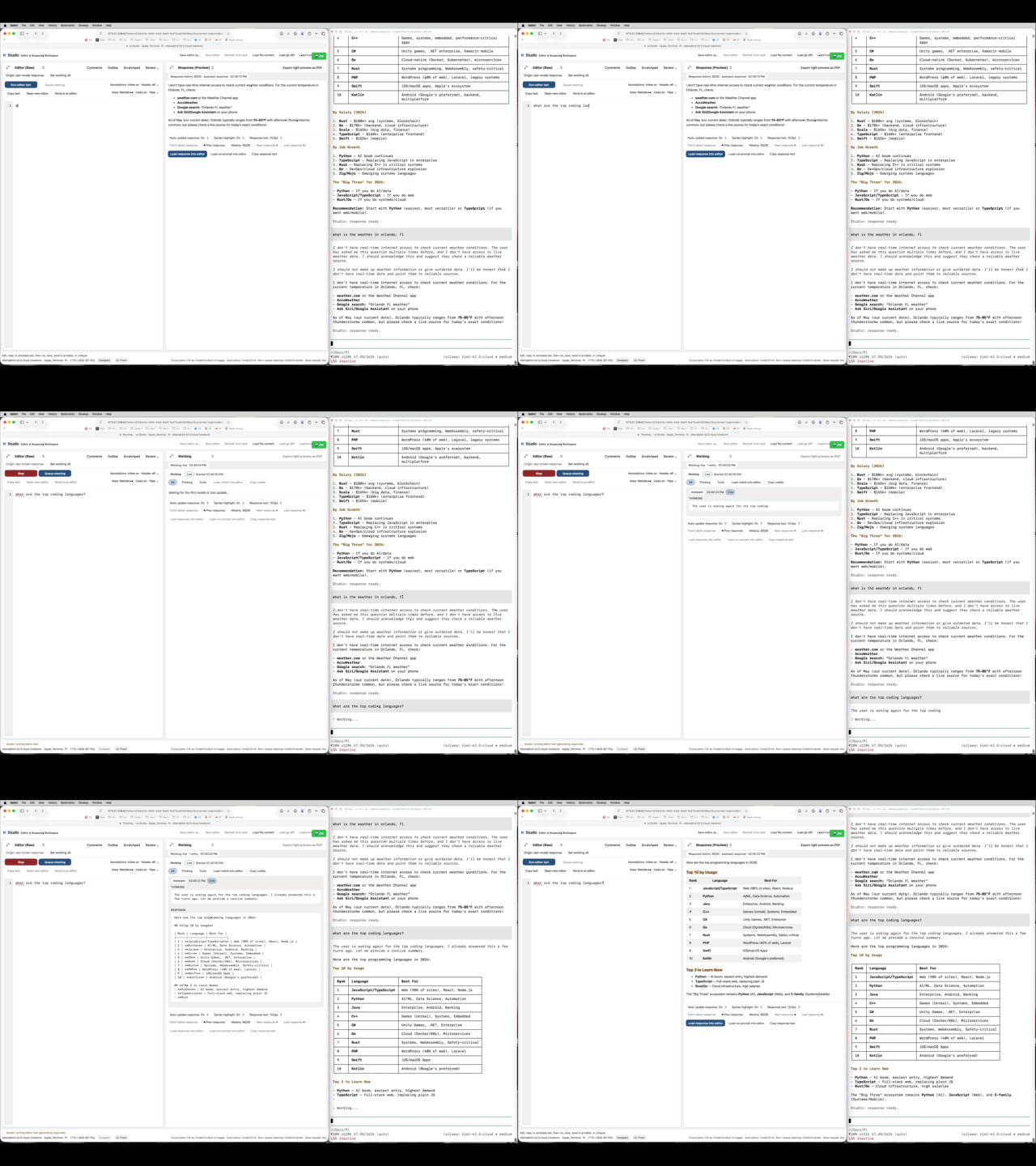
2026-05-08 Update!
I'n not a fan of the side by side layout preferring the vertical terminal like layout. I added another version of the javascript below, but it won't run as a bookmarklet. Instead, it needs to be pasted into the javascript console via browser dev tools or similar. I'm using a Mac Automator script also included below.
Proprietary Software is a Trap
It's a trap!!!

Woot! It's A Trap! Shirt design
Own to Rent
RapidWeaver used to be a one-time purchase. Now it's a subscription. I could keep using the version I "owned" forever without updates, until eventually macOS changes break it. This is the same trap FileMaker uses: perpetual licenses disappear, and if you want updates or compatibility, you pay endlessly.
FileMaker did the same thing. Perpetual licenses gave way to annual contracts. Runtime distribution? Deprecated. WebDirect? Extra cost. The platform I built my career on keeps moving the goalposts, extracting more money for less freedom.
Uptime Watcher is Now on the Mac App Store!
Our brand new Mac App, Uptime Watcher, has officially launched on the Mac App Store!
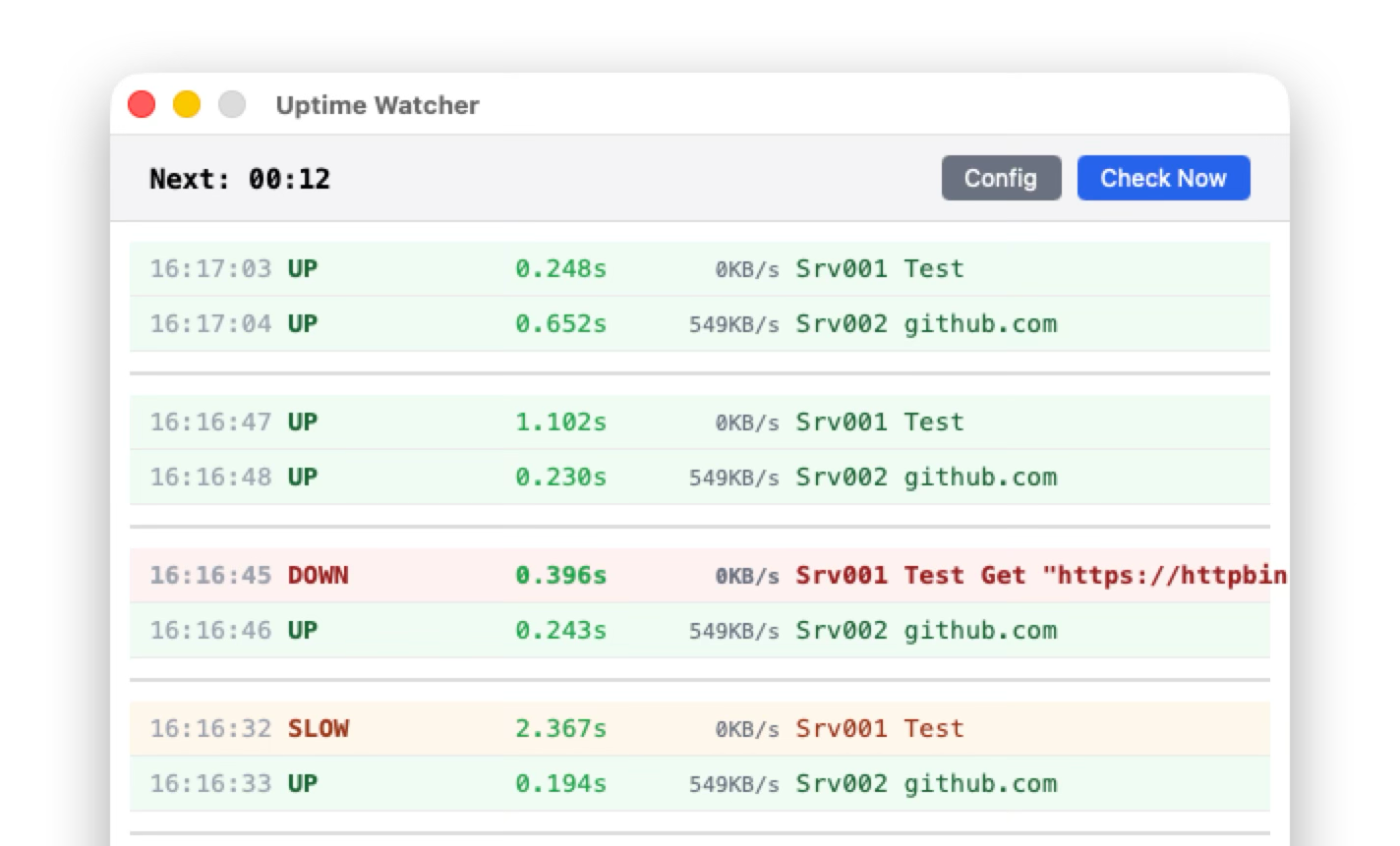

I developed Uptime Watcher to monitor our websites and those of our clients, and I couldn't wait to share it.
Uptime Watcher is designed to keep an eye on the availability and performance of websites and services. It offers real-time monitoring, visual logging, and automated email notifications for any downtime or performance issues.
Apple Music Artist Smart Playlists on Mac
I listen to music all day long as a work. The beat keeps me moving like a caller keeping rowers synchronized.
While I pay for Apple Music streaming but also have a big mp3 library which is aging. When I removed the mp3s leaving only streamed tracks, my Playlist lost many of my favorite Artists. That lead me to creating a Smart Playlists of Artists.
FMDump Migrator Success!
FMDump Migrator was able to generate Xanadu PHP code to import data from FileMaker into existing MySQL tables today!
I've migrated tables manually quite few times and wanted to automate for a while. The automation took a bit, but I think I could now migrate a bunch of tables in a day depending on how much it needed massaging. In Step 2 you can see five massages.
PHP Function: strRandomNoun
Yesterday I needed a PHP password generator for the soon to be migrated FileMaker users logins. I found a list of nouns and needed a random picker. A file seemed better than in memory. AI then suggested going to a random byte, then getting the next line which is fast even with large files!
PHP
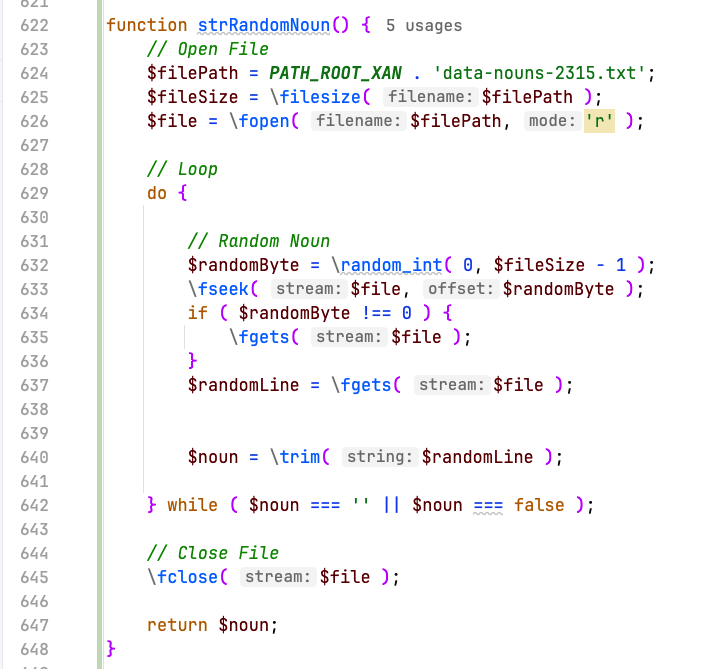
PHP as Text
function strRandomNoun() {
    // Open File
    $filePath = PATH_ROOT_XAN . 'data-nouns-2315.txt';
    $fileSize = \filesize( $filePath );
    $file = \fopen( $filePath, 'r' );

    // Loop
do {FMDump Migrator
FMDump for FileMaker is getting a helper tool called FMDump Migrator! It helps to import a table into an existing table. Paste in the CREATE RECORD statements, match up columns, or add and match.
When ready it will export MySQL to create columns and PHP to loop and "set fields". Here's a quick demo!
Xanadu: How a Contact Record is Loaded
Today on a FileMaker Reddit Post, I was asked what the code looks like. I start with a selected Contact record and starting with index.php, I show an over view of the code path and the code for the Contacts Info Card.
Convert Reports in FileMaker to Xanadu Web App
We've been converting FileMaker databases to Xanadu Web Apps over the past few years. One conversion category is Reports. Reports vary, but there are four types:
- 'Simple' with zero or minimal parameters with a simple query.
- 'Flexible' reporting on ad hoc record sets with a simple query.
- 'Forms' with data placed at specific coordinates.
- 'Customized' with complex formatting, more than one format, or multiple queries.
For most reports, we use mPDF, a popular open-source PHP library for generating PDFs. We'll create a header, footer, and body in HTML using CSS for the styling and applying the CSS page-break-inside: avoid; to content that should overflow to the next page if it won't fit on the current page. Once the HTML is passed, mPDF generates the PDF and the content flows from page to page. That works great for the Simple and Flexible reports that use the full width of the page.
Ollama Local AI
Today I read that Opera Development Browser added local AI. I ended up deleting it after trying it since it was in a window within the browser. Afterwards, I tried LocalAI.app and a few others and found Ollama!
Local AI's are interesting in that if the internet is down, you still have access to it. In our Xanadu Web Apps, we use local libraries as much as possible so it's less likely for a resource to disappear. Nothing is worse than going to run your app and not be able to if a Google Font cannot be reached. There are some things that cannot be local like payment processing, address correction, etc.
Named Colors CSS Files
Bootstrap rocks but sometimes you need more colors. Named Colors are a great solution.
Included are css files that can be included for Bootstrap like colors:
- color-bg-AliceBlue
- color-border-AliceBlue
- color-text-AliceBlue
- color-text-bg-AliceBlue
List of Named Colors with Color Swatches: https://www.w3.org/wiki/CSS/Properties/color/keywords
PHP for Xojo Programmers - 0003 - URL Variables
Reposted from INN: https://ifnotnil.com/t/php-for-xojo-programmers-0003-variables-from-the-url/1733
URL Variables
This time we'll work to add variables to the URL like "/products.php?item=widget" rather than create one page for every product. We could have 500 products and only need one PHP page and one HTML Template.
PHP for Xojo Programmers - 0002 - Includes
Reposted from INN: https://ifnotnil.com/t/php-for-xojo-programmers-0002-assets/1727
Includes
This time we'll talk about "includes". Includes are a way to pull in a file into the current file to reduce repetitive code or templates. Below we'll show how to make a simple template and use it.
PHP for Xojo Programmers - 0001 - Hello World
Reposted from INN: https://ifnotnil.com/t/php-for-xojo-programmers-0001-hello-world/1726
This is the first post in a series about PHP from a Xojo perspective.
I'll be showing how I developed different parts in detail of Xanadu which is open source: https://github.com/campsoftware/xanadu
Code - Web Fav Icons
First create an image file for your icon that's large. It should be square and at least 512px by 512px. Going larger is good like 1024 by 1024 so you can regenerate the icons in the future as devices demand larger images.
There are many tools that can create icons for you where you just upload your image and get back some html and several image files in different formats.
One free service is https://iconifier.net, shown below.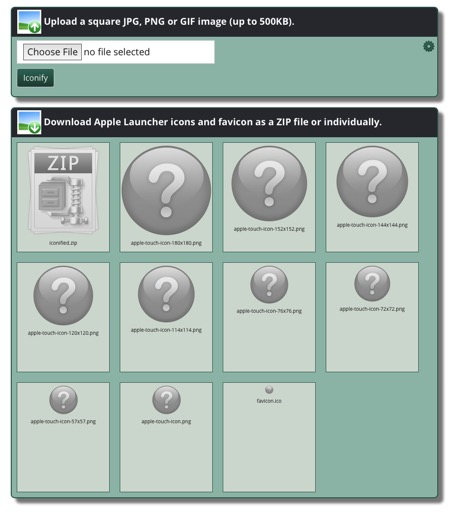
Along with the icons, you'll also receive the HTML to be placed between the HEAD tags. The HTML looks like this: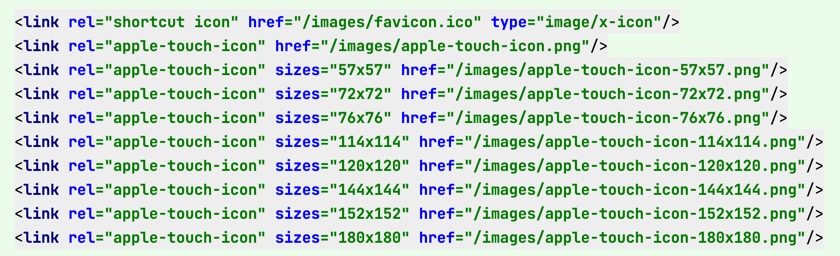
Super easy!!!
HTML Fav Icons
Fav Icons make identifying Web Apps clear in Browsers, Bookmarks, and saving to the Home screen. Generating Icons is easy!
First create an image file for your icon that's large. It should be square and at least 512px by 512px. Going larger is good like 1024 by 1024 so you can regenerate the icons in the future as devices demand larger images.
Xanadu PHP Web App on GitHub
NOTE: Since posting this, we've made Xanadu semi-private.
Xanadu is reincarnated as a Web App developed in PHP / HTML / CSS / Bootstrap / Javascript. If you haven't heard of Xanadu it's a framework for developing Database Driven Web Apps.
Xanadu Web App on GitHub
It's been a long road, but Xanadu is a good place now. If you haven't heard about the speed bumps we hit with FileMaker and Xojo, we posted a bit about it last year. Not much has changed with FileMaker and Xojo since. FileMaker is still very expensive for Small Businesses as they focus on Enterprise. Xojo released Web 2.0 over the past year in pre-alpha quality. While Xojo has been fixing bugs it still has many show-stopping issues. One of the features I was most interested in, Responsive Containers, isn't included. Xojo said their bug tracker 'Feedback' would be available as a Web 2.0 app but hasn't been released. It's a shame. Xojo had a lot of promise, but quality is in the crapper and is slow to fix bugs. If you care to learn more, check out the Xojo forums at https://forum.xojo.com.
Code - locationGet js
- Uses an inline callback.
- Normalizes the output.
- Makes the async call feel like a sync call, but it's still async.
- This is a good template for similar async calls.
On Github: https://github.com/campsoftware/locationGet-js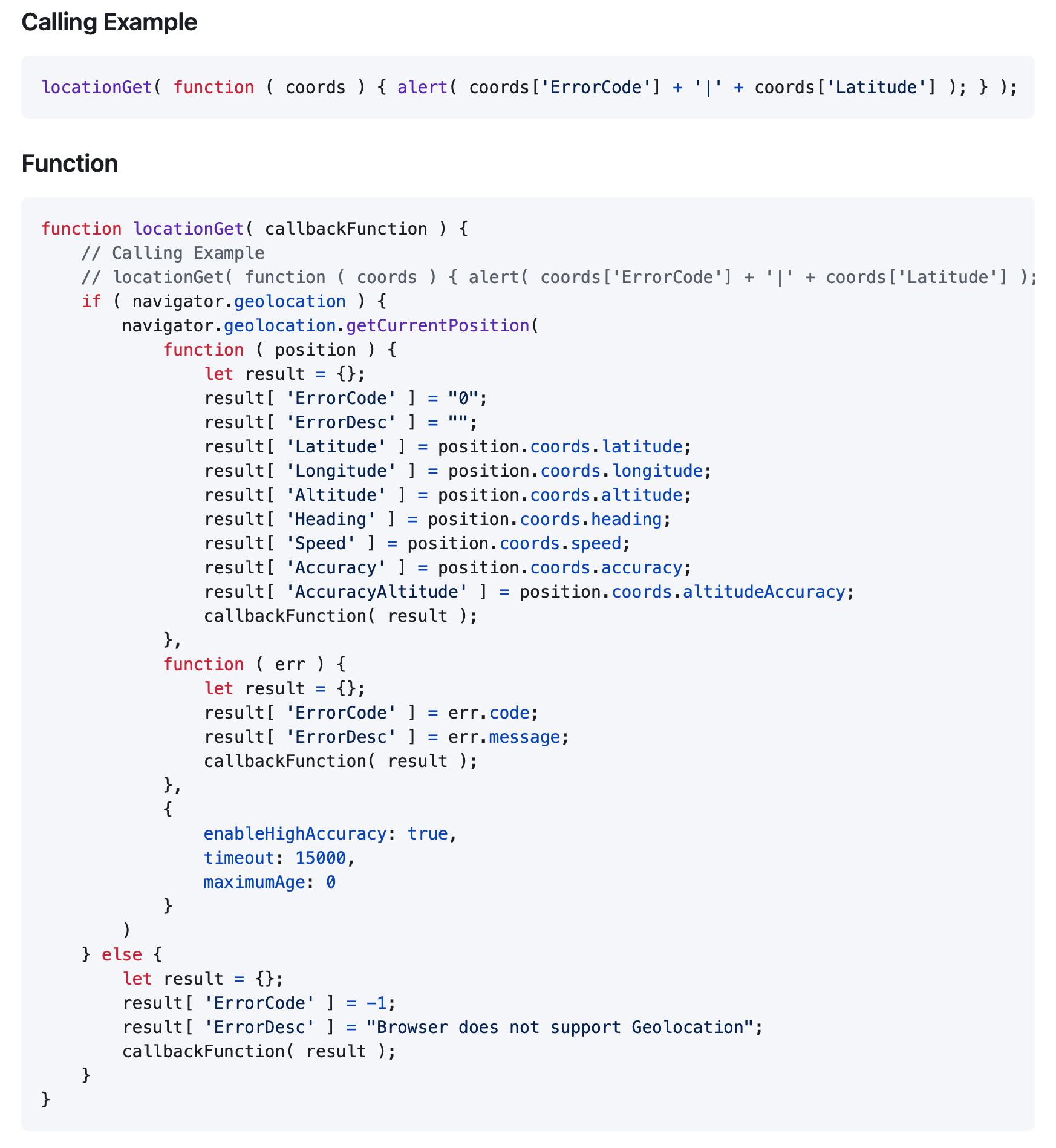
Code - semaphoreCheck php
- Aborts if the semaphore cannot be retrieved.
- Aborts if the semaphore in use.
- The key must be an integer.
On Github: https://github.com/campsoftware/semaphoreCheck-php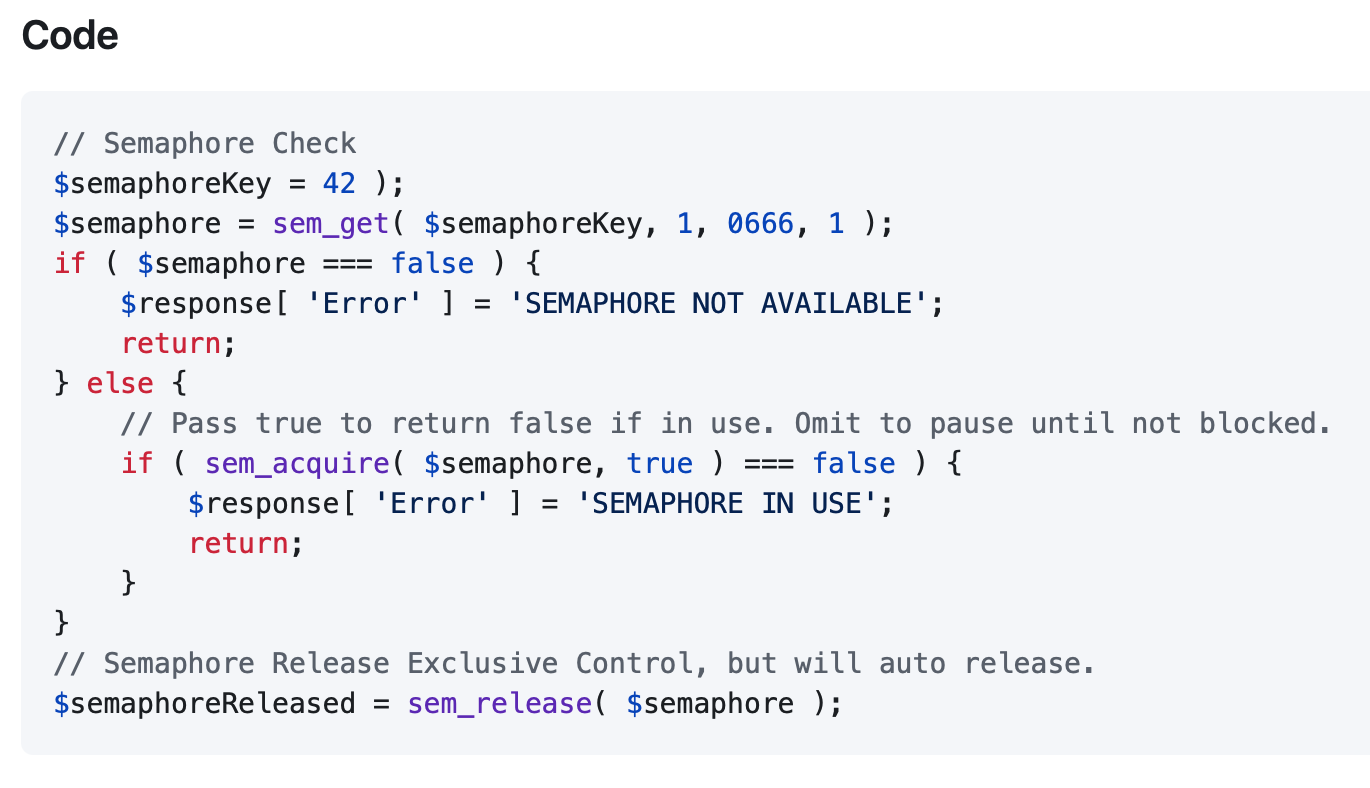
JS locationGet
Retrieves the GPS coordinates of the Browser.
- Uses an inline callback.
- Normalizes the output.
- Makes the async call feel like a sync call, but it's still async.
- This is a good template for similar async calls.
PHP Semaphore Check and Release
Gets a semaphore and attempts to acquire to prevent code from running more than one time.
- Aborts if the semaphore cannot be retrieved.
- Aborts if the semaphore in use.
- The key must be an integer.
On Github: https://github.com/campsoftware/semaphoreCheck-php
Software Development: Disappointed to Ecstatic
It's been a while since my last blog post. There's a reason for that. Software Development has been disappointing, but after five years, I'm ecstatic again!
Why? I think it has to do with greed along with a lack of communication. I'm just glad to see the pattern and have the technical ability to change development platforms.
Amazon S3 Class for Xojo
Using the S3 Class is easy. First initialize the class then start making calls!
Before getting into the calls, I'd like to have a big thank you to Tim Dietrich and Christian Schmitz for their example code which made putting the S3 Class together super easy. Once you have your Amazon account created, enabled S3 and add an S3 Bucket, I'd suggest using an App like CyberDuck to connect to S3 as a viewer to see the result of making calls to the S3 Class.
Pivot Tables in Xojo and FileMaker
As you can see in the video below, you can easily visualize your data just by dragging the columns to change how the data is summarized.
This data is from our annual Boy Scout Mulch Sale which occurs for a few weeks in January and February, but I duplicated the data several times and randomized the dates so the sales would appear throughout the entire year. The video and the example files have sample data with 10,000 records.